
Magictallguy
-
Posts
2,150 -
Joined
-
Last visited
-
Days Won
153
Content Type
Profiles
Forums
Events
Everything posted by Magictallguy
-
Change $q=$db->query("SELECT * FROM users WHERE cdays=0 AND course > 0"); to $q=$db->query("SELECT * FROM users WHERE cdays <= 0 AND course > 0");
-
@Sim is correct; you need to escape your string variables with mysql_real_escape_string(). $name = mysql_real_escape_string($name); $message = mysql_real_escape_string($message); // escape more strings if needed mysql_query(...);
-

help on inserting something in the header mc codes v2
Magictallguy replied to rednspirited's topic in Modification Support
In the endpage() function, just above the closing </body> tag (recommended), or in the startpage() function somewhere between the <head></head> tags -
Create a directory in `/home/your-username` and name it php-sessions (or something equally obvious) And add session_save_path('/path/to/php-sessions'); above any call to session_start() Also recommend you set the filepath as a variable or constant for ease of future dev (example below) // in a config file define('MY_SESSION_FILEPATH', '/preferrably-absolute/path/to/php-sessions'); // at the session start calls session_save_path(MY_SESSION_FILEPATH); session_start();
-
$itmbuy isn't set because it's part of a braceless if statement, resulting in gap between itmsellvalue and effect1. Simply add a little logic to handle the empty inputs Offending snippet: if (empty($itmname) || empty($itmdesc) || empty($_POST['itmtype']) || empty($_POST['itmbuyprice']) || empty($_POST['itmsellprice'])) $itmbuy = ($_POST['itmbuyable'] == 'on') ? 1 : 0;
-
I'd hazard a guess at a countdown until re-opening
-
Hey I need help.wity my game my Crons doesn't work
Magictallguy replied to athena26's topic in Chit Chat
Underscore != space php http://gangsterparadise.rf.gd/cron_minute.php code=YOUR_CODE_HERE Rinse and repeat (with the schedule) for each cron -
Hey I need help.wity my game my Crons doesn't work
Magictallguy replied to athena26's topic in Chit Chat
You added an underscore between `.php` and `code` Additionally, you may want to change that code and keep your new one private 😉 -
Hey I need help.wity my game my Crons doesn't work
Magictallguy replied to athena26's topic in Chit Chat
We can't offer suggestions for potential fixes without knowing a little more about your system. Looks like you're hosted with iFastNet, who do offer crons via cPanel, and at a guess, it looks like you're using MC Codes v2. The cron commands required are given upon installation. Failing that, your cron code will be in `config.php` - you'll need this to allow your crons to run. In your File Manager, you should see 4 files starting with `cron_` (by default); these are `cron_day.php`, `cron_hour.php`, `cron_fivemins.php` and `cron_minute.php` And in your cPanel, you should see a "Cron Jobs" option (usually under "Advanced"). Add a Cron Job for each file, with its schedule settings matching the file's name. Be sure to alter the path (`~/public_html/` given in the example below) to your paths and `YOUR_CODE_HERE` to the cron code you (hopefully) found in your config.php. * * * * * php ~/public_html/cron_minute.php code=YOUR_CODE_HERE */5 * * * * php ~/public_html/cron_fivemins.php code=YOUR_CODE_HERE 0 * * * * php ~/public_html/cron_hour.php code=YOUR_CODE_HERE 0 0 * * * php ~/public_html/cron_day.php code=YOUR_CODE_HERE *Note: cPanel's crontab might play funny with a relative homedir path (the `~`). Simply alter this to an absolute path (`/home/your-cpanel-username`, for example) *Note: Here's a tool I used to reference to understand what the schedule formats mean: Crontab.Guru -
Select dropdown/multiselected drop down item(s) function
Magictallguy replied to Sim's topic in Gangster Legends
To add onto sniko's post; if CLI scares you, I'd recommend a Git GUI, such as SourceTree or GitKraken*; Or, if you're using an editor that support Git out-of-the-box such as PhpStorm**, or an editor that supports plugins (e.g., Atom, SublimeText 3, etc.), just use that! *Note: GitKraken is free for public repos. They put accessing private repos behind a paywall. **Note: PhpStorm has a 30-day free trial, but is otherwise paid software (would strongly recommend it) -
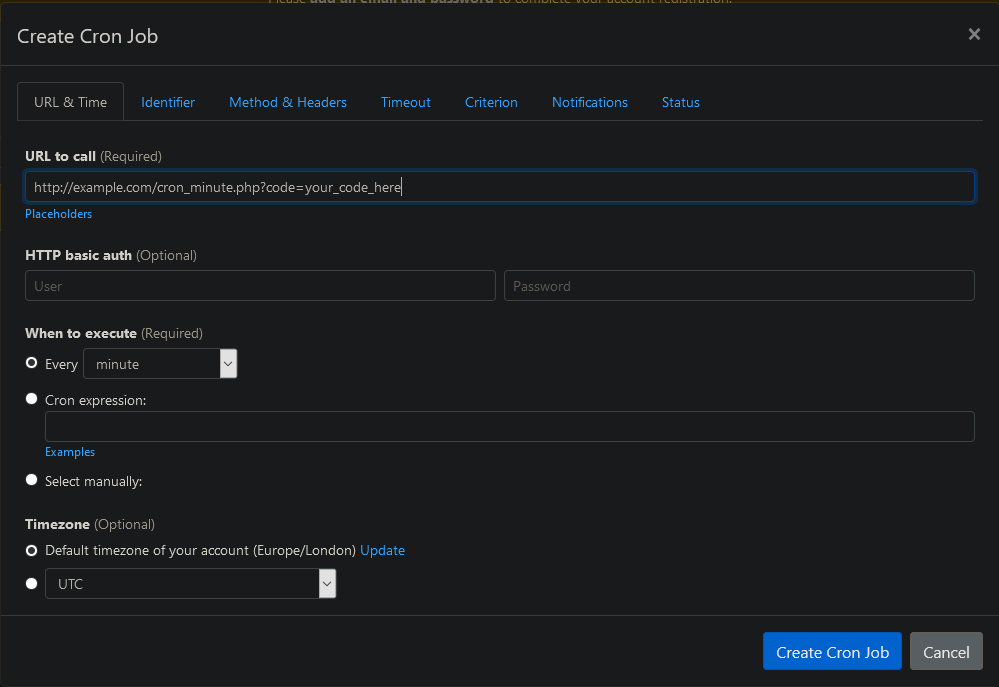
Failing that, a 3rd party cron service is available. Here's the Create Cron UI from EasyCron q

-
Task failed successfully
-
Sounds like you haven't brought the crons online.
-
MCCv2's settings.conf_id is an AUTO_INCREMENTed PRIMARY KEY - there should be no need to reference by ID here INSERT INTO settings (conf_name, conf_value) VALUES ('editpage', 'explore.php');
-
Running a Dockerized instance of the code; Apache 2.4.37, MariaDB 10.5.8, PHP 8.0.2 (with display_errors as On and error_reporting set to E_ALL) on a CentOS 8 image. First error was on the installer was "Field 'display_pic' doesn't have a default value" while attempting to insert the admin account. staffnotes, votes, and usernotepad did the same. After a few minor edits to dbdata.sql, the installer completed successfully and I was able to login. Fair warning to anyone wanting to debug it - you're gonna hit a lot of E_WARNING, E_STRICT, and E_NOTICE -level errors
-
One moment, I'll find out!
-
Challenges aside (hint), what exactly are you after? - From which engine to which engine? - Which mod?
-
There are multiple ways to do this. If Windows, look into XAMPP. If Linux or Mac, look into Devilbox - a Dockerized XAMPP alternative
-
What is this concept of which you speak? "Sleep"?! Nah, that's completely alien to me
-
solved QUERY ERROR: Query was SELECT * FROM gangwars where warID=
Magictallguy replied to Twisted's topic in Game Support
Based entirely on the query alone, I'm throwing a guess that you're running MC Codes v2. Have any edits been made to the code governing the gang surrenders? Were both gangs involved created in a standard manner (e.g., created in-game via creategang.php)? -
While it may be a common practice to blindly open your files to the world, I strongly recommend against this. On most systems (and with varying exceptions to the rule), non-user-modifiable directories should be no greater than 0755 - (read/write/execute to user, read/write to everyone else), and your files should be no greater than 0644 (read/write to user, read to everyone else). Any files written during installation (such as a config.php) will temporarily need world-write permissions to do so. Be sure to change the config file(s)' permissions back to non-world-writable when done
-
I can throw a little PHP code into a .jpg and cURL it to execute whatever I want on your server. Checking the extension alone is not enough
-
Shameless MWG plug!
-
SELECT * FROM some_table WHERE text_column IS NOT NULL ORDER BY some_column