AinzOoalGown
-
Posts
71 -
Joined
-
Last visited
-
Days Won
2
Content Type
Profiles
Forums
Events
Everything posted by AinzOoalGown
-
 Job system will be cool, nice work 🙂
 -
Small Bug found in GangPermissions [Solved]
AinzOoalGown replied to AinzOoalGown's topic in Gangster Legends
Haha yeah. Maybe no one has been kicked from a gang yet 😛 I like to test everything as I get used to a system 🙂 -
Hey, Found a small bug in "gangs.inc.php > public function method_kick()" When kicking a player from your gang will get an error message. This is because of "gangPermissions" not having a capital P (small typo :P): $permissions = $this->db->prepare("DELETE FROM gangpermissions WHERE GP_user = :u"); To: $permissions = $this->db->prepare("DELETE FROM gangPermissions WHERE GP_user = :u");
-
[GLV2][MOD][$30] Ajax Chat w/ Private Messages & Gang Chat
AinzOoalGown replied to Dave's topic in Paid Modifications
Thanks, oh yeah works on mobile. I mainly use my windows PC so dont have emotes like that 😛 Thanks tho -
[GLV2][MOD][$30] Ajax Chat w/ Private Messages & Gang Chat
AinzOoalGown replied to Dave's topic in Paid Modifications
Thanks @URBANZ I changed what you said but it doesn't seem to be working. I changed the dbconn.php, as well as changed "CH_text" in chat db to utf8mb4_general_ci but emoji's still wont show in chat messages. Anything Im doing wrong? EDIT: Just noticed that when I add a message its not "chat>CH_text" that updates, it creates a BLOB in "CM_messages"... -
[GLV2][MOD][$30] Ajax Chat w/ Private Messages & Gang Chat
AinzOoalGown replied to Dave's topic in Paid Modifications
Thanks for the reply. Do you mean setting the collation in chat database to "utf8mb4_general_ci"? I would love to use twemoji but I dont have the knowledge on how to add it haha -
[GLV2][MOD][$30] Ajax Chat w/ Private Messages & Gang Chat
AinzOoalGown replied to Dave's topic in Paid Modifications
Hey, great mod! This might be a stupid question but how do I enable or add emoji's to the chat system? Thanks -
Hey, Wanted to ask what people think would be the best way to add a "Travel Time" to "Travel". So when a player clicks travel it takes a set time for them to arrive at the destination, and while travelling they cant do anything other than work out. I was thinking of using the same logic that is applied for "jail". I want to keep "cooldown" so it will be a new column in database for travel time to be stored. This way a player travels to a destination (travel time = 5 minutes) and wait (cooldown = 2 minutes) to travel anywhere else. Thanks
-
Ah yea, never even noticed lol others seem to be working fine, just not crimes.
-
Ah right, cool thanks
-
Awesome thanks 🙂 @Dayo I think it might be worth making a Guides Section with in GL Forum part to sticky your information guides and documentation. Or a Wiki page maybe. Thanks
-
What you mean dont change vendor files? I have made a whole new Theme (mccodesTheme copied it, changed name of it and activated it) and editing that.
-
How does this work? The module for "PropertyManagement" doesn't have a admin section, and I cant seem to find how a player would purchase or manage any of the properties. Thanks EDIT: Or does a player need to be part of a gang first?
-
Hi, I am trying to understand Cron's as I have added a new userstat "US_ram" and "US_maxRam". This is a replacement of "Brave" which was just a placeholder. However I dont understand how I to use the current cron system, as would like to make it regenerate like "will" does. Ive looked through the source and cant see how "Will" and other stats are regenerated over time, or where to set the timer for this. Can anyone point me in the right direction please? Thanks
-
I believe you can change the colour in bootstrap.css if that is what your trying to achieve. You would amend this part: .alert-success { color: #3c763d; background-color: #dff0d8; border-color: #d6e9c6; } .alert-success hr { border-top-color: #c9e2b3; } .alert-success .alert-link { color: #2b542c; } .alert-info { color: #31708f; background-color: #d9edf7; border-color: #bce8f1; } .alert-info hr { border-top-color: #a6e1ec; } .alert-info .alert-link { color: #245269; } .alert-warning { color: #8a6d3b; background-color: #fcf8e3; border-color: #faebcc; } .alert-warning hr { border-top-color: #f7e1b5; } .alert-warning .alert-link { color: #66512c; } .alert-danger { color: #a94442; background-color: #f2dede; border-color: #ebccd1; } .alert-danger hr { border-top-color: #e4b9c0; } .alert-danger .alert-link { color: #843534; } It is then used in file loggedin.php to display: public function __construct() { $this->globalTemplates["success"] = '<div class="alert alert-success"> <button type="button" class="close"> <span>×</span> </button> <{text}> </div>'; $this->globalTemplates["error"] = '<div class="alert alert-danger"> <button type="button" class="close"> <span>×</span> </button> <{text}> </div>'; $this->globalTemplates["info"] = '<div class="alert alert-info"> <button type="button" class="close"> <span>×</span> </button> <{text}> </div>'; $this->globalTemplates["warning"] = '<div class="alert alert-warning"> <button type="button" class="close"> <span>×</span> </button> <{text}> </div>'; } I am still learning myself so I could be wrong, but from looking this seems correct.
-
If you are using GL V2 then you can edit the theme layout/structure in file /themes/mccodesTheme/loggedin.php, also take in to account the css files (styles.css)
-
Hi and happy new year 🙂
-
Hate people like that, no honour or respect! 🤬
-
Hi thanks. I have it working in profile, it actually in the "Points Shop" I'm trying to display it, so a player can see how many points they have to spend. At the top of the page I have added the text but cant get the actual points to display next to it. AH! Found it!!! 🙂 The array is at the very bottom of the file!. So just added "USpoints" => $this->user->info->US_points and it works now 😄 public function constructModule() { $items = $this->getItems(); $this->html .= $this->page->buildElement("shop", array( "items" => $items, "USpoints" => $this->user->info->US_points )); }

-
@Dayo Do you have an idea on how this is accomplished as I'm still stuck and cant figure it out 😛 Thanks
-
Ah right I understand that bit now for hooks. I have added the new hook, and added $USpoints = $this->user->info->US_points; to userPoints.inc.php, but it still is not displaying users points on the page.
-
So I tried adding a line to the usePoints.hook.php: new hook("pointsMenu", function () { $pointsName = _setting("pointsName"); $USpoints = $this->user->info->US_points; return array( "url" => "?page=usePoints", "text" => $pointsName . ' Shop' ); }); I added: $USpoints = $this->user->info->US_points; But didnt seem to do anything. I checked the hooks info on github and tried to add a new hook to usePoints.hook.php from userInformation: new Hook("userInformation", function ($user) { global $page; $page->addToTemplate('USpoints', $this->info->US_points); }); But this didnt seem to do anything either. Still cant show points.
-
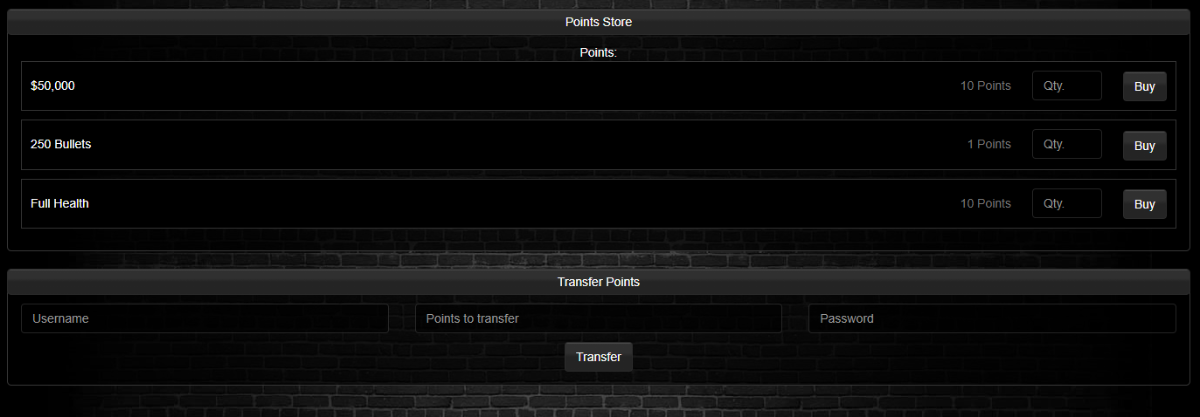
Hi All, I'm still learning so I have another question (more will come I'm sure lol) So I am using the "UsePoints" mod that is part of GL V2 Premium. I have found that a players points is not shown anywhere. I am able to add them to main template header with no issues, but I also wanted to add them to the users profile and in the Use Points section so a player can see the points they currently have. When I try to use {points} in "usePoints.tpl.php" it does not display anything, so though I would have to invoke it. So I edited "usePoints.inc.php" and added "$USpoints = $this->user->info->US_points;" (as "points" was already being used I think, so went with "USpoints") and place it in other functions in usePoints.inc.php to no joy. I edited "usePoints.tpl.php" like this: <div class="panel panel-default"> <div class="panel-heading">{_setting "pointsName"} Store</div> <div class="panel-body"> {_setting "pointsName"} {USpoints} {#each items} <div class="crime-holder"> <form action="?page=usePoints&action=buy" method="post"> <p> <span class="action"> {name} </span> <span class="cooldown"> {number_format cost} {_setting "pointsName"} </span> <span class="cooldown "> <input type="number" name="qty" class="form-control" placeholder="Qty." {#if max}max="{max}"{/if} /> </span> <button name="item" value="{id}" class="btn btn-default" href="?page=crimes&action=commit&crime={id}"> Buy </button> </p> </form> </div> {/each} </div> </div> Adding this bit: {_setting "pointsName"} {USpoints} I then tried to create a new function just to have "$USpoints = $this->user->info->US_points;" in it: public function pullUserData() { $page->addToTemplate('USpoints', $this->info->US_points); } Not sure what I am doing wrong. However I am still unable to pull the players points into the form. The points name shows no problem. If anyone could point me in the right direction that would be great. Still learning how the system pulls data around. Thanks 🙂
-
[Mod] People, Places, Things - Long text(SERIOUS CONCEPT)
AinzOoalGown replied to Sim's topic in Gangster Legends
Haha yeah defo, more minds the better 🙂 -
[Mod] People, Places, Things - Long text(SERIOUS CONCEPT)
AinzOoalGown replied to Sim's topic in Gangster Legends
Awesome 🙂 Glad I could help towards the idea