
-
Posts
2,721 -
Joined
-
Last visited
-
Days Won
93
Content Type
Profiles
Forums
Events
Everything posted by Uridium
-
as @bg_mike has said have you already done an install if so DROP ALL TABLES remove the config.php file and try a new install
-
if you have cpanel on your host goto go into cpanel with yourhost.com/cpanel then find MultiPHP INI Edit icon click it from there dropdown select HOME DIRECTORY and make sure DISPLAY_ERRORS is ENABLED then click APPLY at bottom
-
🙂
-
the users your switching to are they usual game players or users youve created yourself... Cos I can see some flaws if your viewing pages as a paying game member.. wouldnt that effect their privacy rights ? or am I missing something
-
so you want to switch from being staff to becoming a regular member but be able to go back to being staff once finished ?? using the same user account you could do this <?PHP include "globals.php"; switch($_GET['action']) { case 'become_member': become_member(); break; case 'become_admin': become_admin(); break; case 'become_moderator': become_moderator(); break; default: prefs_home(); break; } function prefs_home() { global $db,$ir,$c,$userid,$h; print "<h3>Your Staff Status Page</h3> <a href='?action=become_member'><h3>Become a normal game player</a></h3> <a href='?action=become_admin'><h3>Become Game Admin</a></h3> <a href='?action=become_moderator'><h3>Become Game Moderator</a></h3> "; } function become_member() { global $db,$ir,$c,$userid,$h; $db->query("UPDATE users SET user_level=3 WHERE userid=$userid"); Print"<h3>You have now become a Normal User</h3><br><br><a href='RENAME ME.php'>Return To Choices</a></h3>"; } function become_admin() { global $db,$ir,$c,$userid,$h; $db->query("UPDATE users SET user_level=2 WHERE userid=$userid"); Print"<h3>You have now become an Admin</h3><br><br><a href='RENAME ME.php'>Return To Choices</a></h3>"; } function become_moderator() { global $db,$ir,$c,$userid,$h; $db->query("UPDATE users SET user_level=3 WHERE userid=$userid"); Print"<h3>You have now become a Moderator</h3><br><br><a href='RENAME ME.php'>Return To Choices</a></h3>"; } just alter the RENAME ME.php to anyname your new file is gping to be called
-

DarkCurse Opensource Project - Darkthrone Community Remake
Uridium replied to uaktags's topic in Game Projects
<<<< ORGINAL LINK UPATED IN TOP POST >>>> -
Theres not much information about the game in that description ?
-
This is bloody fab Not the fact the the script work but the fact people have contributed to make it better
-
if you already have a script in front of you that works FORGET about hello world you need to ask how to send your files to your domain FILEZILLA is a fab favourite you log into your site from there and send your files MYSQL always use the PHPMYADMIN cpanel option.. Reading what people do or did wont help cos everyone is different at what they do I know this sounds like pure shite but its how I learnt ECHO and PRINT are on screen visible statements its what you read on the screen example print" hello world "; or echo "hello world"; both do the same thing the write text to screen
-
PHP would be your best option what I used to do is install the game on xampp and find a working page and make an error on the script to see what ERROR message was being displayed that way if you saw the error type again youd kinda have an understanding what could be wrong.. usually misplaced ' or " or even ; throw up some great errors
-
Main thing is have fun with what your doing and dont try take on too much in one go.. go away have a rest and come back to what your doing..
-
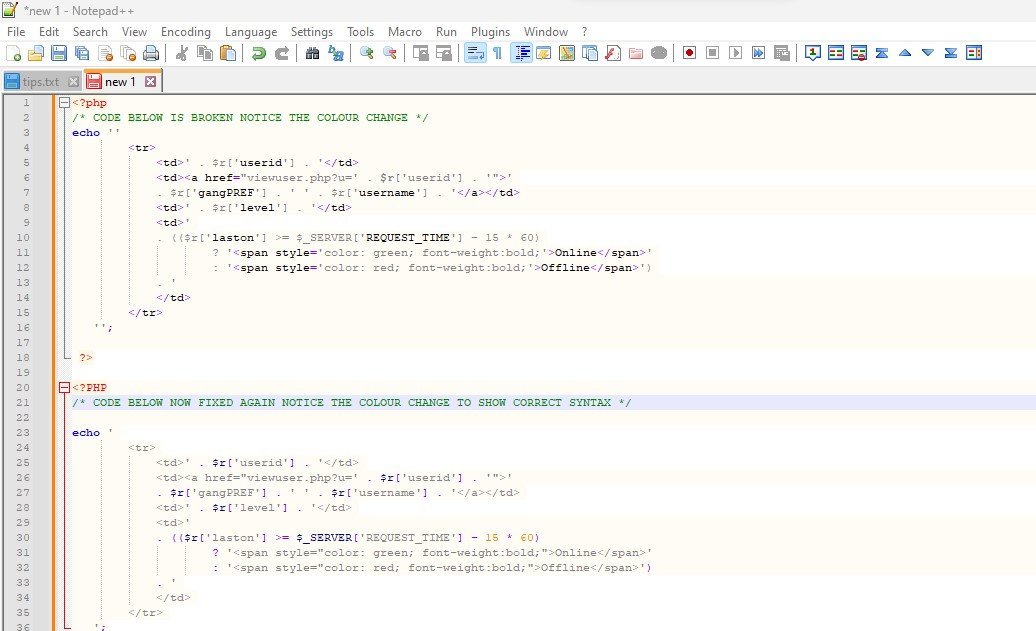
Best advice I can give you is download NOTEPAD++ it will help you sift out PHP Errors I'll show you an example of broken code and what it looks like when fixed using NOTEPAD++

-
excellently said its how I started trial and error cause a problem try fix it
-
My Theradus site is running fine what PHP versions are you all running on php 5.4 im wondering not saying it is but could it be a php version issue google doesnt like
-
few thngs to try?? 1 = Try your URL in a different Browser CHROME, EDGE, FIREFOX, BRAVE see if they all produce same message 2 = Scan any files you have on your computer associated with the site for virus/malware/trojan 3 = Remove the whole site and just add in INDEX.html page see what happens (create a new folder put your old site into that for safe keeping) 4 = If nothing happens with the index.html then try run the new folder see what happens if the warning appears again youve narrowed it down.
-
Seen this happen before cant remember how it was fixed
-
<< REMOVED >> By Uridium
-
SCAMMER
-
Thats fine but what im saying is what if they never went to the user page to attack in the first place you can attack people from their profile pages also ?
-
Who is your hosting company ??? send me a message i'll help you out the probs havent got their PHP version to 5.6 or 6.4 its probably set to 7 or 8
-
https://github.com/coldblooded01/mccodefree/archive/refs/heads/master.zip
-
what if they didnt attack the person from the userlist and attacked them from their profile page would you need a profile page link aswell ?
-
I make free mods but I still give out 100% help when needed..
-
in the days of this site being called "Criminal Existance" id made so many friends and then it went to MWG and then offline for a while Ive lost all the people I knew I wish time could go back to them days..